Obsah
For Admin only
For Admin only
Nostovo
LDAP server
 Synology Docker GUI can't start containers with option to propagate host's hostname inside docker network
--add-host=host.docker.internal:host-gateway
workaround is to add host's IP manually [ must be run from inside of container ]
# echo "172.17.0.1 nostovo.arnostdudek.cz" >> /etc/hosts
- login do DSM UI
- Centrum balicku → nainstalovat LDAP server
- v nastaveni LDAP serveru zvolime jako Provider
- FQDN je domenove jmeno [ je nutne platne kvuli platnosti certifikatu ]
- v Nastaveni pripojeni zakazeme anonymniho uzivatele a vynutime sifrovani [ nutne kvuli bezpecnosti, hesla jsou prenasena nesifrovane ]
- pridame pozadovane uzivatele
pro testovani nainstalujeme klienta pro prikazovou radku
$ sudo dnf install openldap-clients
a zkusime vypsat obsah adresare
$ ldapsearch -x -LLL -H "ldaps://nostovo.arnostdudek.cz" -D "uid=root,cn=users,dc=nostovo,dc=arnostdudek,dc=cz" -W -b"cn=users,dc=nostovo,dc=arnostdudek,dc=cz"
| param | description |
|---|---|
| -x | simple authentication |
| -LLL | extended format |
| -H | LDAP URI |
| -D | bind DN |
| -W | ask for password |
| -b | query |
Nexus
Volume: /volumes1/docker/volume-nexus/
https://nostovo.arnostdudek.cz:8081
http://nostovo.arnostdudek.cz:7981
Docker URL: https://nostovo.arnostdudek.cz:32769/repository/nostovo/
Docker client setup
- upravime / vytvorime /etc/docker/daemon.json
- daemon.json
{
    "insecure-registries": ["nostovo.arnostdudek.cz:32769"]
}
- otocime docker
$ systemctl restart docker
- a prihlasime se
$ docker login [-u <user>] [-p <pass>] <URL>
$ docker login -u admin -p <pass> nostovo.arnostdudek.cz:32769
HTTPS reverzni proxy
z https://www.synoforum.com/resources/synology-reverse-proxy-under-the-hood.135/
- login do DSM UI
- Ovladaci panely → Prihlasovaci portal → tab Rozsirena nastaveni → Reverzni server proxy
- Pridat a vyplnime
Prekladane porty nesmi byt stejne jako porty vystavene dockerem! Zde vzdy <port v kontejneru>-100 zpet na <port v kontejneru> ale jiz HTTPS.
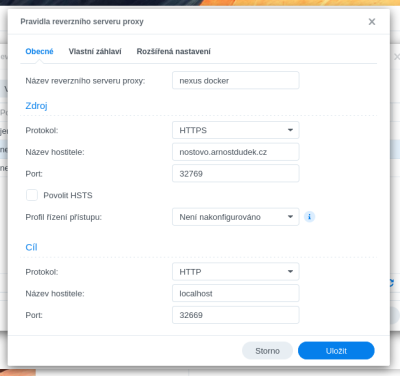
- a prihlasime se
$ docker login [-u <user>] [-p <pass>] <URL>
$ docker login -u admin -p <pass> nostovo.arnostdudek.cz:32769

LDAP prihlasovani
- login do nexusu
- Settings → LDAP → Create new
- LDAP server address: je ve tvaru
ldaps://<FQDN>:636
- Search base DN zkopirujeme Base DN z nastaveni LDAP serveru v DSM
- Authentication method zvolime Simple authentication
- Username or DN zkopirujeme Bind DN z nastaveni LDAP serveru v DSM
- Password opet z nastaveni LDAP serveru v DSM
- overime spojeni
- zvolime Configuration template Posix with Dynamic Groups
- User relative DN zvolime „cn=users“ jinak nemusime menit
- overime nacteni uzivatelu a skupin a take moznost jejich prihlaseni
- presuneme se do Roles → Create Role
- vybereme External role mapping, nasledne LDAP
- Mapped Role nastavime podle detekovanych
| Name | Mapped role | Contained roles | Description |
|---|---|---|---|
| LDAP operators | Directory Operators | ng-admin | allows access for LDAP AD operators |
| LDAP users | users | ng-authorized | allows access for LDAP users |


Jenkins
https://nostovo.arnostdudek.cz:8080
http://nostovo.arnostdudek.cz:7980
Volume: /volumes1/docker/volume-jenkins-home/
$ docker exec -it -u root jenkins-jenkins1 bash
Perzistence dat
„Svazek“ → „Pridat slozku“ → vybrat volume a potvrdit → „Cesta pro navazani“ = „/var/jenkins_home“
WiP: Docker-in-Docker - DIND
$ sudo ln -s /var/run/docker.sock /volume1/docker/docker.sock
<wrap fixme> „Svazek“ → „Pridat soubor“ → cil symlinku → „Cesta pro navazani“ = „/var/run/docker.sock“
Instalace Java 11
- „Manage Jenkins“ > „Global Tool Configuration“ > „Add JDK“
- Label: openjdk-11
- Subdirectory of extracted archive: jdk-11.0.1
- pouzit v buildu dle zadaneho labelu
Pro stable RedHat / Centos / Amazon Linux / … existuje repozitar:
$ sudo wget -O /etc/yum.repos.d/jenkins.repo https://pkg.jenkins.io/redhat-stable/jenkins.repo
$ sudo rpm --import https://pkg.jenkins.io/redhat-stable/jenkins.io.key
uptime-kuma
https://nostovo.arnostdudek.cz:8082
http://nostovo.arnostdudek.cz:7982
https://github.com/louislam/uptime-kuma
Volume: /volumes1/docker/volume-uptime-kuma/
HandBrake
Volume: /volume1/docker/volume-handbrake/config
https://hub.docker.com/r/jlesage/handbrake
https://github.com/jlesage/docker-handbrake
docker run -d \
    --name=handbrake \
    -p 5800:5800 \
    -v /docker/appdata/handbrake:/config:rw \ # Stores the application's configuration, state, logs, and any files requiring persistency.
    -v /home/user:/storage:ro \ # Contains files from the host that need to be accessible to the application.
    -v /home/user/HandBrake/watch:/watch:rw \ # The location for videos to be automatically converted.
    -v /home/user/HandBrake/output:/output:rw \ # The destination for converted video files.
    jlesage/handbrake
- Vytvorime slozku pro docker-compose.yml
- Vytvorime slozku pro vlastni konfiguraci nastoroje - slozka /config
- Pokud nemame, vytvorime slozky pro vstup, sledovani a vystup
- Container manager → Projekty → Novy
version: "3"

services:
  # from https://www.youtube.com/watch?v=g25uQxDr7fQ
  handbrake:
    image: jlesage/handbrake
    container_name: handbrake
    environment:
      - TZ=Europe/Prague
      - USER_ID=1026 # Synology Container creator is using this instead of PUID. This is the same as the user id of the user in the container.
      - GROUP_ID=100 # Synology Container creator is using this instead of PGID. This is the same as the group id of the user in the container.
      # Handbrake GUI settings
      - AUTOMATED_CONVERSION_PRESET=nost/qsv h265 icq25 1080p
      - AUTOMATED_CONVERSION_FORMAT=mkv
      - AUTOMATED_CONVERSION_KEEP_SOURCE=0
      - AUTOMATED_CONVERSION_OUTPUT_SUBDIR=SAME_AS_SRC
    ports:
      - 7984:5800
    volumes:
      # NAS path | Container path
      - /volume1/docker/volume-handbrake/config:/config
      - /volume1/homes/nost23/nvidia_geforce:/storage
      - /volume1/homes/nost23/nvidia_geforce/prekodovat:/watch
      - /volume1/homes/nost23/nvidia_geforce/prekodovano:/output
    devices:
      - /dev/dri:/dev/dri # Binds the Intel Quicksync decoder to Plex HW Transcode
    group_add:
      - "937"  # Synology "videodriver" group
- Povolime webovy portal handbrake → HTTPS na port 8084. Host localhost.
Update
Broken in UI:
$ docker pull jenkins/jenkins:lts-jdk21
$ docker pull codeberg.org/forgejo/forgejo:15
$ docker pull postgres:18-alpine
$ docker pull louislam/uptime-kuma:2